Archive for the ‘ Landscape Photography ’ Category

New Images

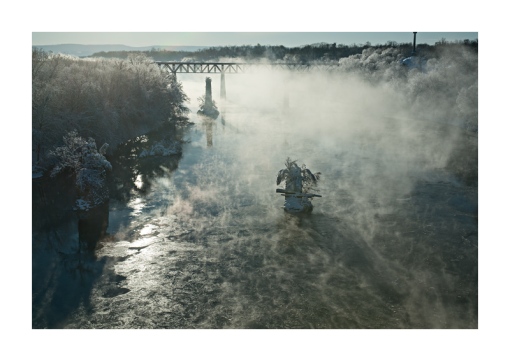
A cold, blue morning after the storm.

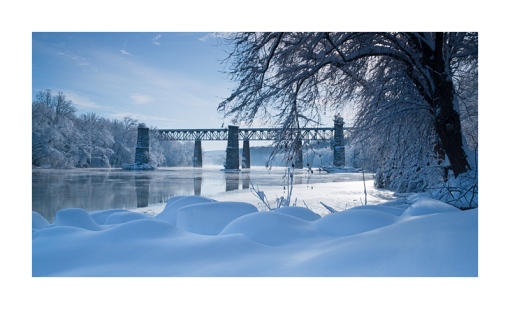
This post is just to let everyone know that I have uploaded some new images to my website. These are from our most recent winter storm. All of them were shot along the Potomac River outside of Shepherdstown, West Virginia. You can view them at http://roberthclarkphotography.com Once there go to the Recent Images Gallery.

As always thanks for looking.

Bob

Potomac River Fog

Fog created by the difference between air and water temperature rolls off the Potomac River near Shepherdstown, WV. Shot with a Sony a900 and a Zeiss 24-70mm lens at 45mm. Image exposed at ISO 100 at f16 for 1/45 of a second.

This image was shot just a day after the big blizzard that hit the eastern seaboard. This is the view downriver from Shepherdstown, WV. I got out early to see what kind of light we had plus I was curious about the road conditions. When I crossed over the bridge I was treated to this amazing sight. The warmer river was interacting with the 12 degree air temperature to create a beautiful rising fog. In addition you can see large sheets of ice in the shot. As these floated down river you could hear them crashing into the bridge piers. Just an amazing vista.

I was shooting almost directly into the rising sun. Most of you who know my work know that I like to shoot these kinds of high contrast images. They make very dramatic shots. The sun was still low in the sky and most of the hot light was filtered by the rising fog. But I still had to use a 4-stop split neutral density filter to help me balance the contrast. I have a few other shots from this day which I will post at a later date.

Bob

Monument Cove – February Featured Image

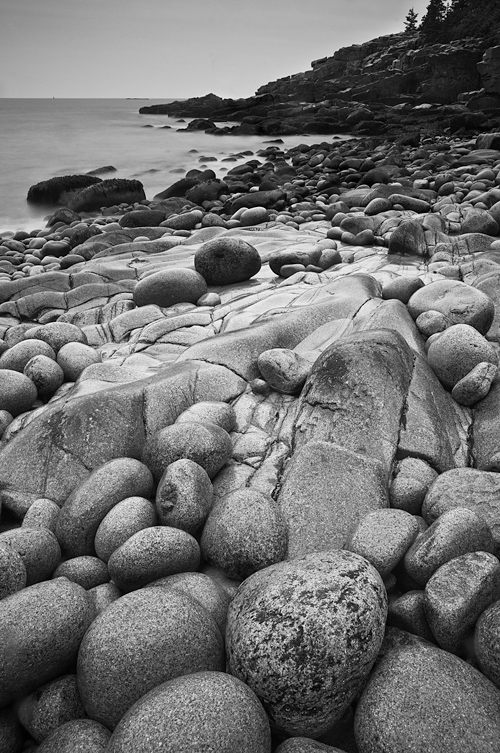
February Featured Image of the Month. Monument Beach at Acadia National Park.

I have just posted the Featured Image of the Month over on my website. Every month or so I will post an image from my archives or current shoots that will be available at a discount from my regular print prices.  The February image is a black and white of Monument Cove located in Acadia National Park. The image was shot in the early morning during a day of rain and drizzle. The slick boulders, many covered in a green algae, proved to be treacherous to walk on. I used a rain cover on the camera and still had to battle wind driven rain on the lens. I carry a small umbrella for conditions like this as well.

The image was shot with a Sony α900 and a Zeiss 24-70mm lens at 24mm. The image was exposed at ISO 200 for 20 seconds at f14. I used a 2-stop Singh-Ray split neutral density filter angled slightly to hold back exposure on the water and sky. The RAW file was processed in Adobe Lightroom and black and white conversion and finishing was completed in Photoshop.

Prints are produced Epson Printers with archival inks on 190 Moab Entrada Natural fine art paper. Prints are available in two sizes; 6″ x 9″ on 8.5″ x 11″, and 11″ x 17″ on 13″ x 19″. All images are titled and signed. Prints can be ordered directly from my website at http:roberthclarkphotography.com. Go to the Featured Image Gallery, select the February image and use the drop down shopping cart feature to select the print size. Payment is direct through PayPal and I will print your image as soon as I receive notification.

Thank you.

Bob

Waikiki Beach Twilight

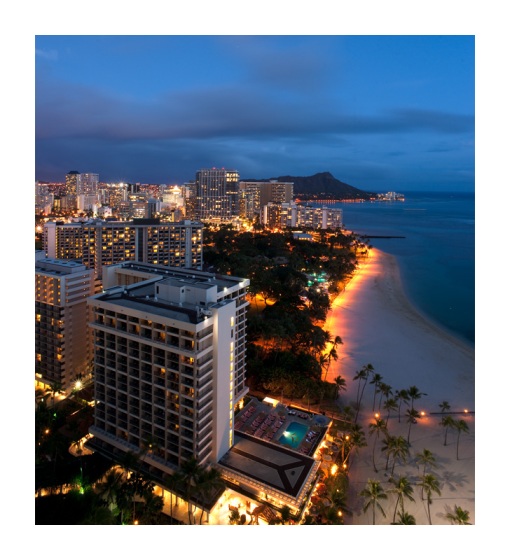
Image 1: Waikiki Beach and downtown Honolulu. Shot with a Sony a900 and a Sony SAL 20mm. Image exposed at ISO 100 at f16 for 60 seconds.
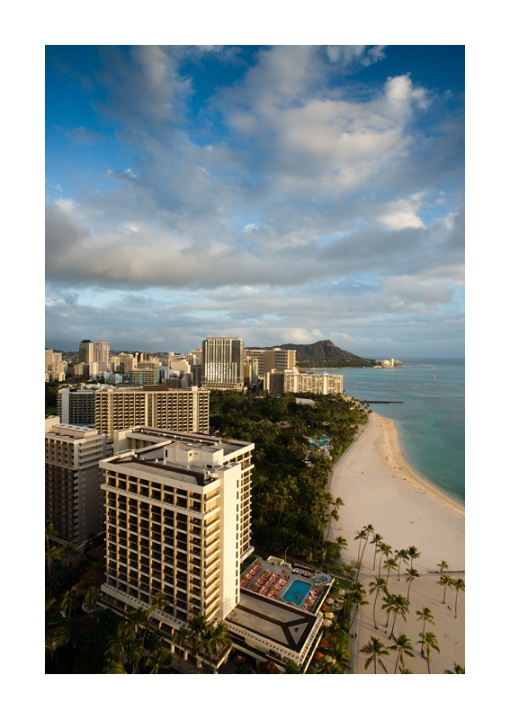
Clouds drift over Waikiki Beach and downtown Honolulu. Shot with a Sony a900 and a Sony SAL 20mm. Image exposed at ISO 100 at f16 for 1/6 of a second. Lenswas fitted with a Singh-Ray 2-stop split neutral density.

This is one of my favorite views of Waikiki Beach. The image was shot at twilight about 30 minutes after the sun had set. This is the optimum time to get this kind of exposure where the sky is a deep, beautiful blue that compliments the city lights. In order to get a shot like this there are a few rules to follow:

1. Scout the Shot: This is something you hear a lot from photographers but its true. I have been to this location before and pre-visualized this exposure.

2. Know your Astronomy: What I mean here is know where the sun rises and sets and at what time.

3. Set up Early: Get to your location ahead of time. This gives you time to set up, compose, figure out what filters you might need, watch the light, and take test exposures.

4. Be There: Shots like this happen everyday but you have to be there. Galen Rowell said there are only so many sun rises and sunsets. Get out and shoot.

To capture this kind of shot you need to wait till the sky and cityscape reach an equal EV, generally around 5. This means if you took a spotmeter reading on the sky and the city and the reading was approximately 5 you are ready to go. This generally occurs approximately 30 minutes after sunset. The exposure will typically be 45 seconds to a minute. The result is a beautiful cerulean sky complimenting the orange lights. I also set the color balance to about 4800 to 4900.

Image 2 was shot approximately 50 minutes before the twilight shot. This is why you get to your location early so you can capture the light on your subject as it changes.

Mahalo from Hawaii.

Bob
Diamond Head Sunset

Storm clouds clear over the ocean. Shot with a Sony a900 and a Sony SAL 20mm lens. Exposed at ISO 100 at f16 for 2 seconds. Image shot with a Heliopan Polarizer and a 3-stop Singh-Ray split neutral density.

So you are probably wondering about all these Diamond Head shots. Well its very picturesque and it happens to be the view from my room. This shot was made at sunset. The light was pretty flat and blocked by the expansive cloud cover but a small hole opened up for about a minute spreading light into the landscape.

I used a Singh-Ray 3-stop split neutral density filter to account for the difference in contrast between the sky and landscape. Additionally I used a Heliopan warming polarizer to accentuate the clouds. The light was beautiful.

Unfortunatley I made a major mistake in that I forgot to reset my camera from the days shooting and shot this as a high res JPEG. Not an end of the world mistake but one that does not leave me a lot of headroom to manipulate the file. The JPEG rendering from the Sony proved to be quite good though so all is not lost. So this is just a reminder to all to make sure you check your camera settings prior to a shoot.

Diamond Head Sunrise

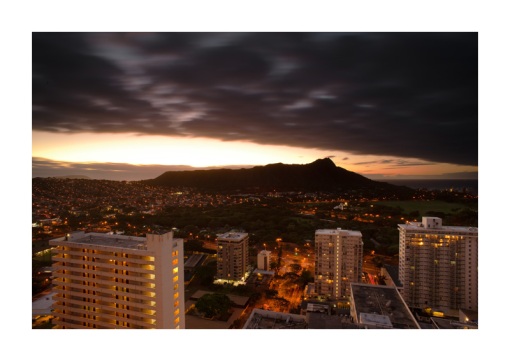
Sunrise over Diamond Head, Oahu, Hawaii. Shot with a Sony a900 and a Sony SAL 20mm lens at f16 for 30 seconds.

This is an early morning view of Diamond Head, as a band of dark clouds moves over Oahu. To capture this shot I used a Singh-Ray 3-stop Reverse, Split Neutral Density. This is a more specialized neutral density where the darker portion of the filter is in the middle and fades upward. It is very useful in situations like this where the brightest contrast is in the middle portion of the shot.

Bob

Slot Canyon Glow

Image 1: The interior walls of Upper Antelope Canyon glow from sunlight penetrating from above. Shot with a Sony α900 and a Sony SAL 20mm lens. Image exposed at ISO 100 at f14 for 2 seconds.

Image 2: Reflected light reaching down into Lower Antelope canyon literally causes the walls to glow. Shot with a Sony α900 and a Zeiss 24-70mm lens at 28mm. Image exposed at ISO 100 at f14 for 2 seconds.

I was searching through some of my site statistics and noticed I had a request for the best lenses for shooting inside a slot canyon. So here are 2 images shot this year in Upper and Lower Antelope Canyon in April. At this time of the year the sun is rising higher in the sky and the light more fully penetrates into canyon. The first image was shot at 10:30 in the morning and the walls were glowing.

Slot canyons do come with some challenges including diminished light and narrow, almost claustrophobic space. Additionally, the light moves within the canyon as the sun passes overhead. Within minutes a once glowing wall will be plunged into shadow. My Sony 20mm f2.8 lens is one of my favorites for tight spaces. I also use a Zeiss 24-70 f2.8. The advantage in using the 24-70 is getting the wide angle view but having the flexibility to zoom in for more detail or to isolate an area. My exposures range from 1 to 2 seconds to well over a minute at ISO 100. To mitigate camera shake I recommend shooting in mirror lock-up mode. I shoot in manual mode: manual metering and manual focusing.

I have been asked about filters and I do not use them in the slots. For a shot like Image 1 I will increase the white balance to 6000 to accentuate the warmer colors. You can also achieve this effect by shooting with the shade color balance setting.

Image 2 was shot in Lower Antelope canyon in the early afternoon. This canyon is deeper and the light penetrates later than Upper Antelope. The effect here is other worldly. The canyon wall appeared to glow from within. Again no filters were used, only an adjustment with the white balance.

I would encourage anyone visiting the Page area to take the time to go to Antelope Canyon. If you do you can book your visit with Carol Bigthumb at Adventurous Antelope Canyon Photo Tours.

As far as equipment you will need a good wide angle such as a 20 or 28mm, and a medium range zoom can help isolate details. A tripod is a necessity. And flash is not allowed inside the canyons.  When you go please respect the canyon and your hosts. They are places of immense beauty and serenity. And perhaps if you are lucky, as the soft notes of a flute echo off the canyon walls you will feel the heartbeat of the place.

Bob

Design a site like this with WordPress.com
Get started